
WhatsApp has started rolling out usernames, a privacy feature that lets people chat without revealing their phone numbers. Meta said users can reserve a username starting this week and use it later this year when the feature launches more broadly.
The early reservation phase is being opened; WhatsApp has more than 3 billion users, and many names overlap across the platform.
With this feature, users will be able to use a unique WhatsApp username instead of relying only on a phone number. WhatsApp said the feature is being introduced to improve privacy, especially for people who want to talk to someone without handing over a number first.
The feature is still in a staged rollout; Reservations are opening first, while the full username feature will arrive later this year.
How the username feature works
WhatsApp says usernames are not public handles in the social-network sense. There is no public directory, and usernames are not searchable.
To start a chat, the other person must know the exact username. That design keeps the feature tied to private messaging rather than discovery.
The reservation flow is also being used to reduce conflicts around common names. Early reservations are meant to help people claim the username they want before the wider launch. Some usernames used by public figures and brands are being reserved to reduce impersonation risk.
[ALSO READ: Meta Is Building Cheaper AI Smart Glasses. Here’s Why It Matters ]
What makes it different from phone-number messaging
This is the first major change to WhatsApp identity since the app became widely associated with phone-number-based contact lists. A username allows a person to be reachable without exposing the number behind the account.
The move is especially relevant outside the U.S., where WhatsApp is used far more heavily for everyday communication, business interactions plus community chats.
Users get a privacy layer. They can still use WhatsApp normally with phone numbers, but usernames make it possible to share contact details more selectively. The feature is designed for situations such as first contact with a business, a public-facing account, or a person who does not want to hand out a mobile number.
The username key adds another filter; even if a username is leaked, the key can still block unwanted contact.
How to create a WhatsApp username
If the feature is available for your account, creating (or reserving) a WhatsApp username takes only a few steps.
How to create a WhatsApp username (For Android Users)
- First, update your WhatsApp.
- Then open WhatsApp.
- Tap ⋮ (three dots) → Settings.
- Go to Account.
- Tap Username.
- Enter your preferred username.
- If it’s available, confirm and save it.
How to create a WhatsApp username (For iPhone Users)
- Update your WhatsApp.
- Open WhatsApp.
- Tap You (or Settings).
- Tap your Profile.
- Select Create Username.
- Choose an available username and save it.
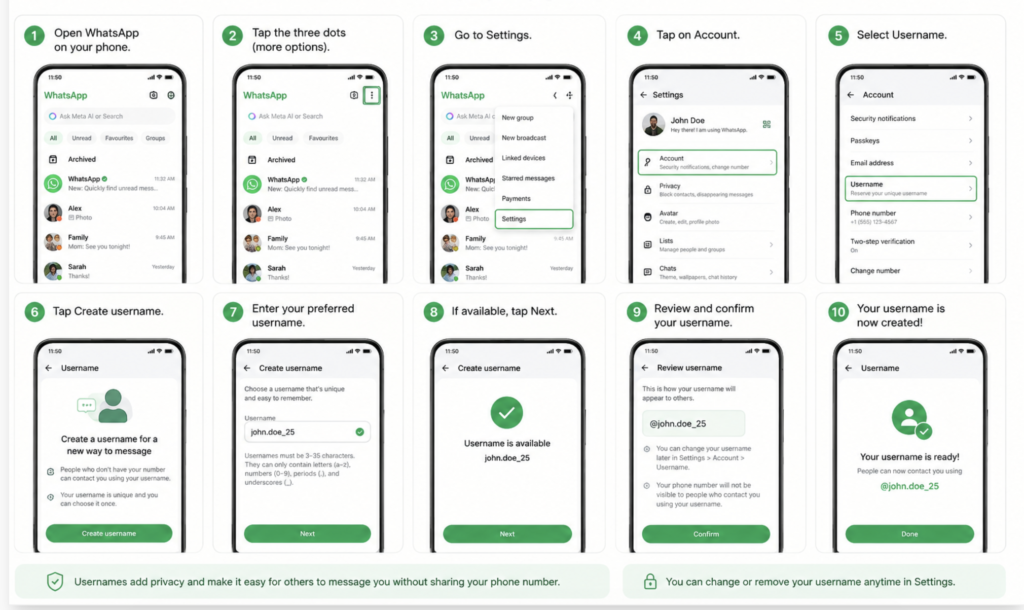
Note: The rollout is gradual. If you don’t see the Username option in your WhatsApp, the feature may not be available on your account yet. WhatsApp says it will notify users in the app when username reservations become available.
Username rules
WhatsApp says usernames:
- Must be 3–35 characters long.
- Must start with a letter.
- Must contain at least one letter.
- Can include:
- letters (a–z)
- numbers (0–9)
- periods (.)
- underscores (_)
- Cannot:
- Start with www.
- finish with a domain such as .com or .net
- Start or finish with a period
- contain consecutive periods (..)
Additional features
- You can choose to use your existing Instagram or Facebook username, if it’s available and eligible.
- WhatsApp also includes a username generator to suggest available alternatives if your preferred name is already taken.
- An optional Username Key (a short security code) can be enabled to add another layer of protection, so someone needs both your username and key to start a new conversation.
[ALSO READ: Meta Invests $900 Million in CRED, Appoints Kunal Shah as WhatsApp Global CEO ]