
Ask Maps is a new Gemini AI-powered conversational feature in Google Maps that lets users ask complex questions about places and get personalized recommendations back on a map. The company says the rollout has started in the U.S. and India on Android and iOS, with desktop support coming later. Google also ties the launch to a broader Maps update built on Gemini models.
Ask Maps features
Ask Maps is designed for questions that are harder to answer with a normal search box. To answer, it analyses a vast amount of data, including reviews, web pages, business profiles, user behaviour data, and third-party sources. It is powered by the Gemini family of models and provides conversational, intent-based recommendations.
Google’s examples include asking where to charge a phone without waiting in line, finding a public tennis court with lights, or planning stops on a route. The system returns conversational answers and a customised map, and it allows follow-up questions in the same chat. Google also says users can act on the result by getting directions, saving places, sharing them, or booking restaurant reservations.
Google says Ask Maps draws on Maps’ live place data, reviews, and contributor information to give more context than a static route or listing. In the company’s own description, it uses information from more than 300 million places and community input from more than 500 million contributors.
Availability
Google says Ask Maps is rolling out now in the U.S. and India on Android and iOS. The company adds that desktop support is coming soon. The official Maps help page also shows that users can access the feature inside the Google Maps app under the search bar by tapping Ask or Ask Maps.
What is different from earlier Maps
The main difference is the shift from a search-and-route tool to a more conversational planning tool. Earlier Maps use was mostly about finding a place, checking directions, and reading reviews one by one. AI-powered, Ask Maps tries to combine those steps: it answers a question, shows the result on a map, and then lets the user move straight into planning or navigation. Google describes this as making exploration into “a simple conversation” rather than a series of separate searches.
Privacy and security
Google’s support pages say Maps’ AI-powered features may use a user’s location and account information to make responses more relevant and personalised. If Web & App Activity is turned on, Maps can personalise AI responses using Maps history, saved lists, reviews, ratings, photos, and Search history. Google says that when you click on a place and ask a question about it, Maps does not use or collect your location.
Google further says it does not use the questions you type into Google Maps to train its AI models, although it may analyse them to improve products and services. The company also warns that AI answers can be wrong and tells users to double-check important details and send feedback when something looks off. The Maps help page says users can view past Ask Maps conversations in History and delete the full conversation if they want to remove it.
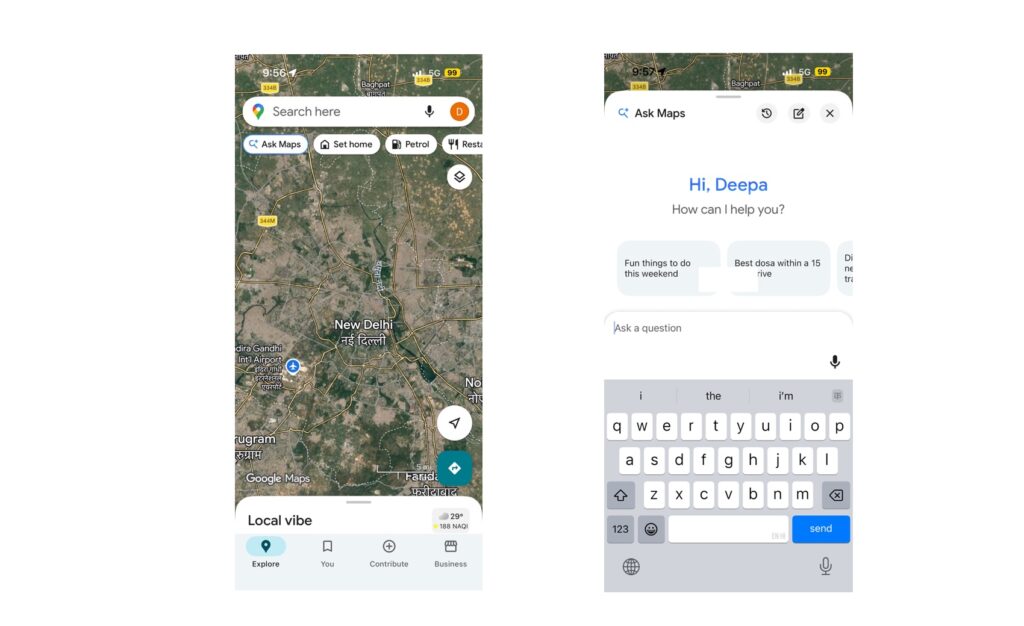
Google Maps is evolving from a navigation app into an AI-powered travel assistant. If you use Google Maps for route checking and travel, open the Google Maps app on a phone or tablet, tap Ask Maps under the search bar, type a question or use the microphone, and then tap Send. Users can keep asking follow-up questions in the same thread. Past conversations can be found under History in Ask Maps.